
The Hidden Mechanical Labor Gap in Your CCC ONE Estimates
One missed click in CCC ONE can cost your shop hundreds of dollars on a single supplement.
Picture a Tuesday afternoon. Your estimator is working a supplement, the adjuster is waiting and two more estimates are in the queue. The teardown turned up mechanical work, so the estimator adds the lines in CCC ONE®, checks the hours and sends it.
What they didn't do in the rush is change the labor type from Body to Mechanical. The work is mechanical. The estimate bills it at the body rate. Nobody notices and the difference never comes back.
Two labels on every line
Every CCC ONE line carries two separate attributes. The component type says what kind of part the work is on and it comes from the parts database. The labor type says which rate the hours bill at: Body, Refinish, Frame, Mechanical and so on. On an A/C condenser, a radiator or an impact sensor the two should agree. Nothing forces them to. A line added by hand, or left on the default, keeps the body rate until someone changes it.
This isn't a knowledge problem. Experienced estimators know which operations are mechanical. They miss it the same way anyone misses one field out of dozens when the shop is full.
Where the gap shows up
Lines left on Body in a supplement. The simplest case and the most common. Say your mechanical rate is $115 an hour and your body rate is $65. Eight hours of mechanical work billed at body is $400 left on one supplement. Repeat that across a month of supplements and it adds up.
Mechanical time folded into body labor. Some operations change what else counts as included. One of our shops added a frame replacement to a 2016 F-150 and the 9.6-hour mechanical engine and transmission R&I turned into "Incl." under 35 hours of body labor. CCC ONE showed no warning. At that shop's rate gap, that one line was a large share of the job's margin.
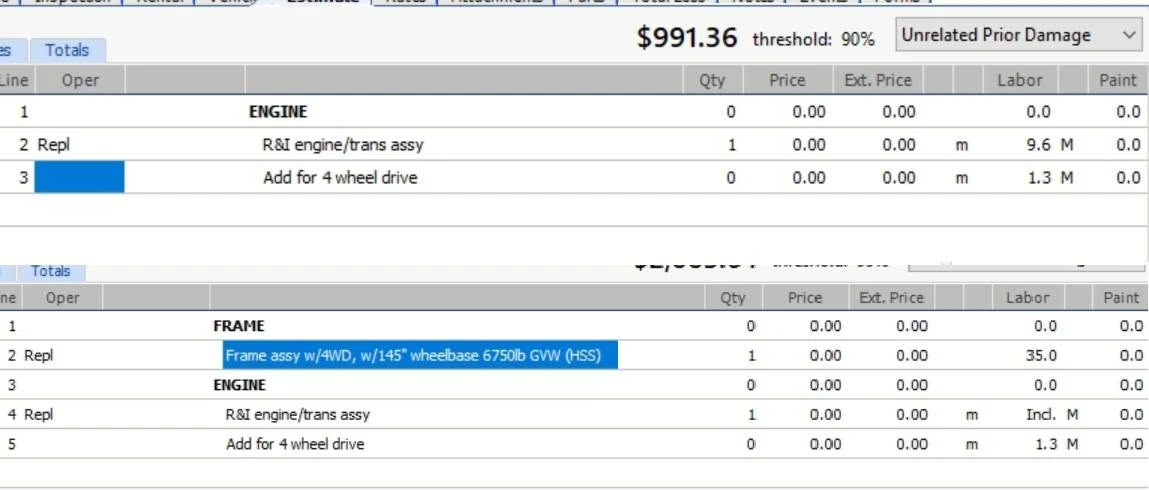 Top: the engine R&I on its own, 9.6 h mechanical. Bottom: after the frame replacement is added, the same line reads Incl.
Small lines that never look worth chasing. Evacuate and recharge, refrigerant recovery, a cooling shroud, an impact sensor. Each is a few tenths of an hour. Listed RO by RO for one shop in March 2024, they added up to 82.7 hours billed at the body rate.
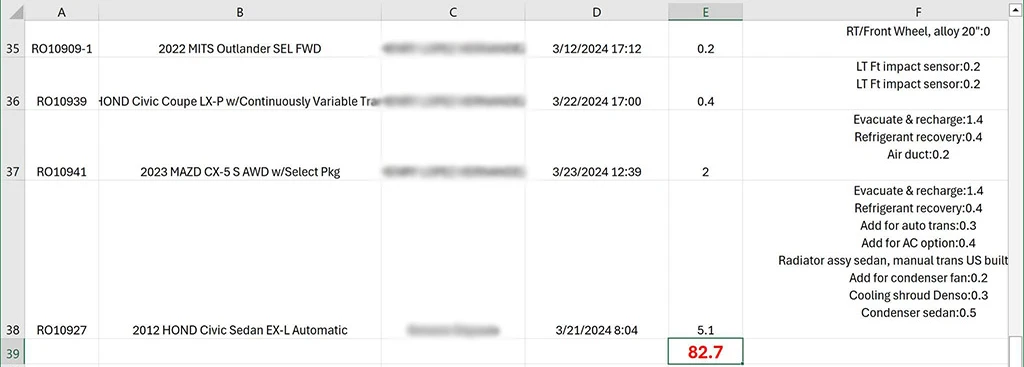 One shop, March 2024: mechanical operations billed at the body rate, RO by RO.
What it adds up to
Across real CCC ONE estimates in our shops, about 22.7 mechanical hours per 100 estimates end up on a non-mechanical labor type.
What each hour is worth depends on your rates. In Massachusetts, a state labor rate board survey of 476 shops found an average charged rate of $68 an hour for body work and $108 for mechanical, a $40 gap (Repairer Driven News, March 2026). At $40 an hour, 22.7 hours is about $910 per 100 estimates. A shop writing 30 estimates a month is looking at roughly $270 a month, before counting anything else the estimate missed.
The wider industry numbers point the same way. Collision Advice tracks mechanical labor hours per claim by state: 2.3 in Georgia at the top, 1.2 in Alabama, about half an hour in Hawaii. Mike Anderson's view is that the real figure should be closer to five or six (Autobody News, September 2025). And in the 2025 Who Pays for What survey, only 15% of shops bill alignments at a mechanical labor rate (Repairer Driven News, June 2025).
How to catch it by hand
You can close most of the gap with a routine, if someone has the time to run it on every file:
- On every supplement, check the labor type of each added line, not just the hours.
- When you add a large body operation, such as a frame, a radiator support or a quarter panel, look for lines that just turned into "Incl." and check what they were before.
- Keep a short list of operations your shop always bills at mechanical: A/C, cooling, suspension, steering, electrical and sensors.
- Read the P-pages for the operations you write most, so you know what is and isn't included.
The weak point is the word "every". A routine that depends on a busy estimator remembering it will slip on exactly the days the shop is busiest.
How EstVis catches it
EstVis imports every new and updated CCC ONE workfile on its own and checks every line against three conditions:
- The component type is mechanical, and
- the labor type is not mechanical, and
- the line has billable hours.
Every match is flagged on the case, grouped by RO, with the line, the operation, the wrong labor type and the hours at stake. It also flags when an updated estimate loses mechanical hours, which is how the F-150 frame job above was caught. EstVis surfaces what needs changing; your team makes the change and files the supplement in CCC ONE. It is the same rule on every line, not a model's guess and nobody has to remember to run it. When you connect CCC ONE it also scans the jobs already in your pipeline, so the first flagged line usually shows up the same day.
Mechanical labor is one place an estimate leaves money behind. Estimating rules, zero-hour labor lines, parts price differences and paint materials are others and EstVis checks those too. Your team does the work. Make sure the estimate bills for all of it.