 Workflow4 min read
Scheduling Chaos – Why Your Bodyshop Needs a Scheduling Solution Beyond the Status Quo
The modern collision repair bodyshop operates at a relentless pace.

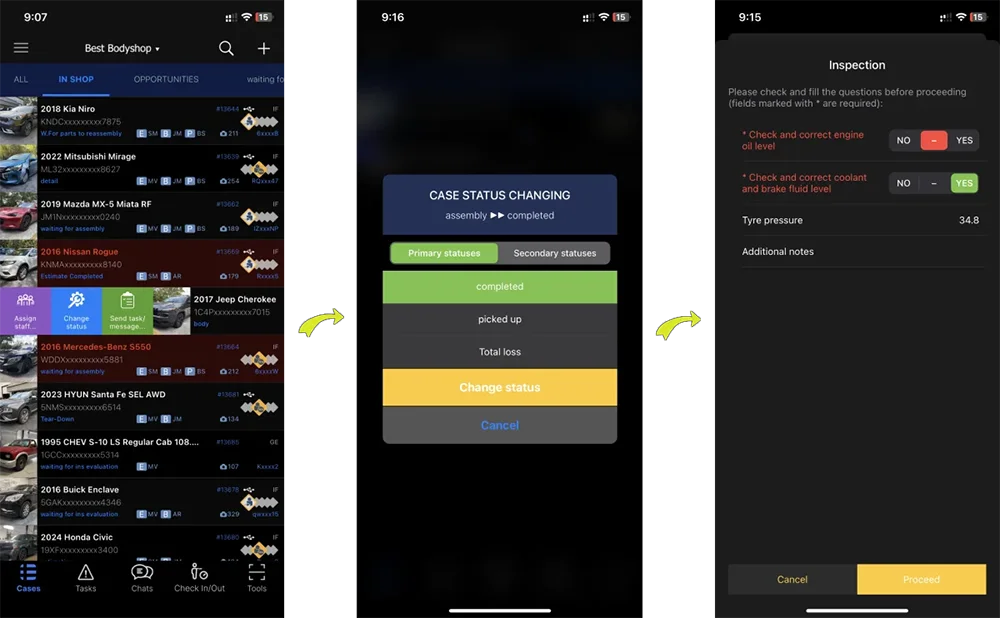
A bucket is not just a column – it holds the rules. Staff assignment goes down to a single estimate line, so nobody walks the floor to find out who has the car. On Pro a check sheet fires on the way into a bucket or on the way out: required answers gate the move, and every completion logs who answered what and when, with a PDF into the case folder.
New assignments have to get keyed into a board or a spreadsheet before anyone can work them, and that's one more place for a car to fall through.
Nobody remembers which check sheet goes with which bucket until the one time it matters and gets skipped.
Finding out who's on a car – the estimator, the bodytech, the painter – means walking the shop floor or interrupting someone at a workstation.
CCC® ONE, Mitchell® and Audatex® assignments auto-import into Workflow the moment they're written, landing in the bucket your shop has configured for new work – no rekeying, no separate spreadsheet.
Assign an estimator, bodytech or painter to a case, and the internal messenger keeps every note and task attached to the car it's about, not scattered across texts and sticky notes.
Attach a check sheet to a bucket – triggered on the way in or the way out – and the required fields have to be answered before the case can move again. Buckets, rules and check sheets are all yours to define.
Runs on
Runs on your own hardware, on-premise. Keeps working through an internet outage.
The Windows application your team works in all day. Unlimited installs.
iOS and Android, for the work that happens away from a desk.
Core – $166/mo billed annually
$199/mo on monthly billing · 8 users included
The board ships in Core: buckets, staff assignment down to the estimate line, the internal messenger, time tracking and the scanners. Pro adds the rules that make a bucket move do work – condition-based triggers, check sheets, and the customer message that turns a status change into one less phone call.
See the full pricing breakdownWorkflow4 min readThe modern collision repair bodyshop operates at a relentless pace.
 Workflow4 min read
Collision repair shops thrive on efficiency and employee satisfaction.
 Profitability4 min read
Every moment matters when operating in the dynamic collision repair sector.
Customer Pipeline
Every bucket move can trigger a text or email – damage-photo request, status update, pickup notice, follow-up – so the phone stops being the only way a customer finds out what's happening to their car.
Photo Documentation
Templates guide the shot list, and every photo files itself to the case with the description an insurer expects. On Pro the customer can capture it themselves, from a texted link, before the car reaches the shop.